Affichage des articles dont le libellé est ubuntu. Afficher tous les articles

jeudi 9 mars 2017

Trouver le paquet Debian ou Ubuntu fournissant un fichier donné


Vous pouvez utiliser la commande dpkg pour savoir quel paquet possède un fichier:


dpkg -S <fichier>

exemple

pascalfares@BureauChefDepInfo:~$ dpkg -S /bin/ls

coreutils: /bin/ls


Vous pouvez aussi rechercher le contenu des packages inclus dans les différentes versions d'Ubuntu sur le site Web des packages Ubuntu.

jeudi 13 novembre 2014

How can I install Sun/Oracle's proprietary Java JDK 6/7/8 or JRE?

The Script way


If you're on a fresh installation of Ubuntu with no previous Java installations, this script automates the process outlined above if you don't want to type all that into a console. Remember, you still need to download Java from Oracle's website -- Oracle's links are not wget friendly.
Before using this make sure that this script is in the same directory as the .tar.gz file extension that you downloaded and there are no files that start with jdk-7 in the same folder. If there are, please move them out of the folder temporarily. Remember to make the script executable (chmod +x <script's file>).
#!/bin/sh

tar -xvf jdk1.8*  #Change by the you downloaded from oracle
sudo mkdir /usr/lib/jvm
sudo mv ./jdk1.7* /usr/lib/jvm/jdk1.7.0
sudo update-alternatives --install "/usr/bin/java" "java" "/usr/lib/jvm/jdkx.y.z/bin/java" 1
sudo update-alternatives --install "/usr/bin/javac" "javac" "/usr/lib/jvm/jdkx.y.z/bin/javac" 1
sudo update-alternatives --install "/usr/bin/javaws" "javaws" "/usr/lib/jvm/jdkx.y.z/bin/javaws" 1
sudo chmod a+x /usr/bin/java
sudo chmod a+x /usr/bin/javac
sudo chmod a+x /usr/bin/javaws
If you want to install the plugin for Firefox then add this to the end of the script:
mkdir ~/.mozilla/plugins
ln -s /usr/lib/jvm/jdk1.7.0/jre/lib/amd64/libnpjp2.so ~/.mozilla/plugins/
sudo /etc/init.d/apparmor restart

mardi 23 septembre 2014

How to Enable DVD Playback in Ubuntu 14.04

Thanks to the open-source software libdvdread, it provides the library to read DVDs in Ubuntu Linux.
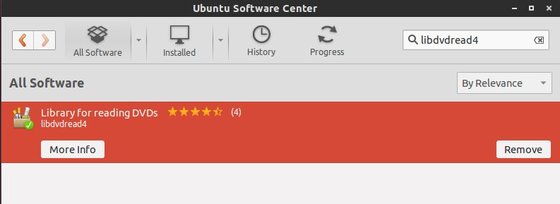
To install it, open Ubuntu Software Center and search for and install the packagelibdvdread4 and libdvdnav4.
install libdvdread4 library to read DVD
After that, press Ctrl+Alt+T on keyboard to open the terminal. When it opens, run:
sudo /usr/share/doc/libdvdread4/install-css.sh
This script will allow you to play encrypted DVDs in Ubuntu.
UPDATE: Since Medibuntu is no longer available, you have to install libdvdcss2 repository manually. Download it from the link below:
Once installed, you’ll be able to playback and navigate DVD menus in most video applications, including the default Totem and VLC.

mercredi 25 décembre 2013

Get started with Juju!

Ubuntu and Android dual boot developer

Dual boot is not a feature suitable for regular users. It is recommended to be installed only by developers who are comfortable with flashing devices and with their partition layout. Dual boot rewrites the Android recovery partition and those installing it should be intimately familiar with re-flashing it in case something goes wrong.
Multiple Android flavours are supported (AOSP or stock, CyanogenMod) and installation of Ubuntu can be done for all versions available in the phablet-flash channels.
http://developer.ubuntu.com/2013/12/announcing-ubuntu-and-android-dual-boot-developer-preview/ 

lundi 2 septembre 2013

Configuring Apache 2 on Debian, Ubuntu

The Debian distribution of Linux includes the Apache web server, both the venerable version 1 and the more modern version 2. The Debian maintainers have a peculiar way of arranging the configuration files for Apache 2.0 which is not documented in the standard Apache documentation. This introduction should help you get acclimated to the Debian way of configuring Apache 2.0.

Active Configuration Files

# /etc/apache2/apache2.conf - pulls in additional
# configurations in this order:
Include /etc/apache2/mods-enabled/*.load
Include /etc/apache2/mods-enabled/*.conf
Include /etc/apache2/httpd.conf
Include /etc/apache2/ports.conf
Include /etc/apache2/conf.d/[^.#]*
Include /etc/apache2/sites-enabled/[^.#]*
Debian stores its Apache 2.0 configuration files in the directory /etc/apache2. Normally the main Apache configuration file is called httpd.conf. Although that file exists on Debian, it is only there for compatibility with other software that expects it to exist. The real configuration starts with the file apache2.conf. You can still add configuration statements to httpd.conf, as apache2.conf includes it, but you would do well to ignore that fact. Your hand-edited changes should go elsewhere (see below).
Debian adds another configuration file, ports.conf, which contains the Listendirectives telling the Apache server what IP address and port to listen to (Apache 2 no longer uses the Port directive.) I’m not sure why the maintainers decided to break this out into a separate file.
The best place to put your own custom configurations is in the conf.d directory. Files in this directory are included as part of the “global” server configuration and will apply to all virtual hosts (see below). For example, if all the sites on your server use the Yahoo User Interface libraries, you might store one copy of the libraries in a central location that can be shared across all sites, and create a file /etc/apache2/conf.d/yui.conf with an Alias directive to map it to the same URL space for all sites.

Apache Modules

# Files related to Apache modules
/etc/apache2/mods-enabled/*.load
/etc/apache2/mods-enabled/*.conf
/etc/apache2/mods-available/*.load
/etc/apache2/mods-available/*.conf
/usr/sbin/a2enmod
/usr/sbin/a2dismod
One of the great advantages of the Apache web server is its modular architecture. You can add or remove functionality as dictated by your requirements. In the default Apache build, you would find a section near the top of your httpd.conf file with instructions to load each module. Later in the file, you would find configuration sections specific to each module, possibly wrapped in a<IfModule> directive. This arrangement can be tricky from the perspective of a system administrator who may need to install or uninstall various Apache modules. Identifying the configuration changes that are required by a module or that require a specific module can be difficult to do by hand and even harder to automate with a script.
To make things easier on the server administrator, Debian takes advantage of the fact that Apache configuration files may contain an Include directive which pulls in additional configuration files. Debian creates two non-standard directories: /etc/apache2/mods-enabled and /etc/apache2/mods-available. Whenever you install an Apache module from a Debian package, the module will drop one or two files into the mods-available directory. The mandatory ${module}.loadcontains the Apache Load directive to load the module into your web server. The optional ${module}.conf file contains additional configuration directives necessary for the operation of the module.
Installing a module from a Debian package makes it available to your server, but does not (necessarily) automatically activate the module in your server. To activate the module, use the a2enmod command:
a2enmod ${module}
/etc/init.d/apache2 force-reload
The a2enmod command will create symbolic links in the mods-enabled directory pointing to your ${module}.load and, if it exists, ${module}.conf. To force a running Apache to re-read its configuration files and thus load the module, you must then send it the force-reload signal.
Likewise, to disable a module:
a2dismod ${module}
/etc/init.d/apache2 force-reload
Issue either command without a module argument and it will print a list of appropriate module names.
You can, of course, manually manage the symbolic links in the mods-enableddirectory, but it is safer and easier to use the provided scripts.

Virtual Hosts

# Files related to Apache virtual hosts
/etc/apache2/sites-enabled/[^.#]*
/etc/apache2/sites-available/*
/usr/sbin/a2ensite
/usr/sbin/a2dissite
Virtual Host is just a web site served by your Apache server. Virtual hosts are managed just like modules. Each site gets its own configuration file that contains all the Apache directives that pertain only to that site. These files (or symbolic links to them) should be placed in the sites-available directory. There are no strict naming requirements for these files (files beginning with . or # will be ignored), but for convenience you should name each site configuration file to match the domain name it is serving. There is no need to add a “conf” extension. For example, the vhost file used for this web site is namedwww.control-escape.com.
To activate any of these sites, use the a2ensite command, which operates identically to the a2enmod command mentioned above. There is a respectivea2dissite command for disabling a site.
Even if you only run one web site on your server, Apache is still configured to have one virtual host, the Default Virtual Host. The default virtual host is treated specially by the a2ensite script. If you look in your sites-enabled directory you will find that the link has been named 000-default. The number is prepended to the name by the a2ensite script to ensure that the default virtual host is the first one included by Apache (which sorts the files alphabetically). If you want other sites to be loaded in a particular order other than alphabetical, you can rename the links here, but you should always ensure that the default virtual host is the first one loaded.

Conclusion and Resources

Although Debian’s configuration setup for Apache 2 is non-standard, it is still fairly easy to understand, and it provides tools that make life easier for the administrators of web servers that change often or serve multiple web sites. For additional help, view the Debian README file at /etc/apache2/README. For general information on configuring Apache, try these resources.
To learn more about Debian GNU/Linux, visit Debian.org.
To learn more about Ubuntu, visit Ubuntu.com, or buy a copy of The Official Ubuntu Book

vendredi 10 mai 2013

Ubuntu dev proposes new package format for mobile apps

In a move that could see Ubuntu veer even further away from the Linux mainstream, Canonical has proposed a new software packaging format designed to make it easier for developers to publish apps for Ubuntu's tablet and phone–friendly future incarnations.

"This is not aimed at changing packages that are already part of the Ubuntu archive; for the most part our existing system works well for those, and they tend to have non-trivial dependency structures," Canonical's Colin Watson explained in a post to an Ubuntu developer mailing list on Wednesday.

Complete Story : http://www.theregister.co.uk/2013/05/09/ubuntu_click_packages/

mardi 7 mai 2013

Can Cloverleaf Linux be the Ubuntu of rpm world?


Posted: 06 May 2013 06:30 AM PDT
The now defunct Fuduntu team has come together to create a new distribution which they initially called FuSE Linux which was complementing Fedora and openSUSE.

Posted: 06 May 2013 09:47 PM PDT
Plasma Desktop is infinitely configurable, here's some tips I use to be more productive.

jeudi 24 janvier 2013

Ubuntu’s Mobile OS Offers Full Linux Desktop Integration, Coming to Phones Later in 2013


Canonical took the wraps off its Ubuntu mobile operating system today. Ubuntu for Android combines the Android mobile operating system and the Linux-based desktop OS, so when you dock the handset you get the full desktop OS. Ubuntu is expected to start shipping these devices in late 2013.
The mobile version of Ubuntu is built around Google's Android OS and it promises to take advantage of multi-core handsets to bridge both the mobile experience of Android and the productivity of the Ubuntu desktop experience. So you can have one address book, inbox, set of bookmarks, call log, and more in one device. You'll be able to dock (or undock) your phone to a keyboard, mouse, and large monitor to seamlessly switch from mobile to desktop mode.

mardi 20 novembre 2012

Ubuntu Raring Now 13% Complete, 10% Of Porting To Mobile Devices Complete


Nexus 4 Does Have An LTE Chip On Its Shoulder

Posted: 19 Nov 2012 02:15 AM PST


A teardown by iFixit reveals that Google's flagship phone Nexus 4, manufactured by LG, does have an LTE chip in it.


Ubuntu Raring Now 13% Complete, 10% Of Porting To Mobile Devices Complete

Posted: 19 Nov 2012 09:00 PM PST

The Ubuntu development team have published a nice status page where you can readily monitor the development of upcoming versions of Ubuntu. From that status page, we learned that around 13% of the proposed work for Raring Ringtail is complete. One of the chief aims of Ubuntu 13.04 Raring, i.e. porting it to embedded and mobile devices is complete. However, only 1% of work is complete for Kubuntu 13.04.

Gnome Shell 3.7.2 Out, Supports Search Providers

Posted: 19 Nov 2012 08:59 PM PST

A new version of the Gnome Desktop, Gnone 3.7.2 is out. This version includes several stability and performance improvements along with bug fixes theta will make the Gnome desktop more stable, secure and reliable. Among the many changes in this release, the most important is the support for remote search providers. Now not only you will be able to search Wikipedia and Google from Gnome, but also will be able to search files, folders and documents from the single Gnome search bar.

Firefox Is Now Available For Android Devices With ARMv6 Processors 

Posted: 19 Nov 2012 07:53 PM PST

With its support to older ARMv6 processors Firefox for Android can now run on millions of new Android devices. The new browser also has many features like seamless intregration with TalkBack and support for Explore by Touch.

Keep Up With Your Wordpress Blog With The Amazing Firefox Extension

Posted: 19 Nov 2012 03:34 AM PST

If you have a Wordpress.com blog and want to keep notified with it even without visiting the site, you can just install an amazing extension that alerts you from time to time regarding activities in your blog. Every time some one follows you, likes your posts or comments on them , you will get a notification alert on the sidebar of your browser. Much like Facebook notifications, you can click on the icons and navigate straightaway to the page from where the activity happened.

Valve Adds Three More Game Titles To Linux, Invites More Testers

Posted: 19 Nov 2012 03:19 AM PST

Game developer and distributor Valve has ramped up Steam for Linux by adding three more game titles. Steam for Linux was originally released with 24 titles and now the count stands at 27. You can see all the games supported in Linux platform in this page.

Here Comes PengPod Tablet Which Dual Boots Linux As Well As Android

Posted: 19 Nov 2012 03:18 AM PST

We have heard dual-booting in PCs, Macs and Laptops. The amazing technology allows one to oot into two OSes in a single computer. User has to specify different partitions for the OSes he wants to boot and is provides with options during booting. Dual booting was unknown in tablets and mobile phones until lately. Innovators have come out with PengPod, that will be able to boot Android as well as Linux in a single tablet.
Future Gnome Releases May Include Application Sandboxing

Posted: 19 Nov 2012 03:12 AM PST
With computers and applications becoming more and more smarter everyday, one is coming more close to security breeches and loopholes. Security issues today are more complex and harder to detect than they were five years ago. Developers are becoming more and more aware of this situation and they are finding out way to make computing more secure, fast and relaible.

Controversial Nautilus 3.6 Lands Up In Raring Ringtail

Posted: 19 Nov 2012 03:11 AM PST

The much hyped Gnome's file manager Nautilus 3.6 has made its way to the upcoming version of Ubuntu, Raring Ringtail. This version was earlier not adopted in Quantal due to many of its controversial changes. The whole desktop was upgraded to Gnome 3.6 while the file manager remained of 3.4 branch. Linux Mint developers on the other hand made their own fork of file manager called Nemo. This is similar to the earlier attitude taken by the developers, i.e. bring their own fork of Gnome as they did for Cinnamon.

lundi 19 novembre 2012

XBMC Media Center 12.0 Beta Out, Ships With Android Support , Ubuntu Gaining More Popularity As A Server OS, Skype For Linux Updated to 4.1, Ships With Windows Live Support, Lead Compiz Developer Leaves Canonical To Persue Education, Enlightenment Desktop Alpha 3 Release Out, First Stable Release On The Way, Egosoft Porting X Series Game To Linux

XBMC Media Center 12.0 Beta Out, Ships With Android Support 

Posted: 18 Nov 2012 10:51 AM PST

Open source video and home theater PC software XBMC has hit another beta and this version ships with some cool features, stability enhancements and bug fixes. Also, this version, which is codenamed "Frodo" ships for some new platforms like Raspberry Pi and Android.

Ubuntu Gaining More Popularity As A Server OS 

Posted: 18 Nov 2012 10:49 AM PST

Ubuntu, which is more inclined to be a OS for desktops is gaining more popularity as a server OS. Lately, statistics done by W3Techs show that Ubuntu is installed on 7% of servers world wide. Thats a huge number given the popularity of the web and more and more websites and servers coming out everyday.

Skype For Linux Updated to 4.1, Ships With Windows Live Support 

Posted: 18 Nov 2012 10:48 AM PST

Skype, the popular video conferencing app for Linux has been updated to version 4.1. This update ships with Windows Live Support in Skype. Earlier, to chat with Windows Live users, Linux users needed to rely on other chat clients like Empathy or Pidgin.

Lead Compiz Developer Leaves Canonical To Persue Education 

Posted: 18 Nov 2012 10:46 AM PST

A leading Ubuntu developer has left Canonical to persue his University studies. Sam Spilsbury worked in Compiz development for quite a long time of two years and recently announced his quitting in a blog post

Enlightenment Desktop Alpha 3 Release Out, First Stable Release On The Way 

Posted: 18 Nov 2012 10:17 AM PST

The Enlightenment desktop is a different kind of desktop environment, which aims to be lightweight, efficient, configurable as well as attractive. The desktop has been in active development for over a decade, and was in alpha stages till now. The first stable release is expected to be on 21st of December this year.

Egosoft Porting X Series Game To Linux 

Posted: 18 Nov 2012 07:05 AM PST

German game developer Egosoft has decided to port its popular X series games to linux. They want to offer "unified product on Steam" so that their users can run their game across multiple platform.

mercredi 15 août 2012

Does Windows 8 help set the stage for mainstream Linux desktops?


Takeaway: Windows 8 will release soon and this could be the perfect storm the Linux desktop has needed. Couple that with a few missteps by Microsoft and Linux is looking at a big and bright future. Do you agree?
How long has the open source crowd been shouting at the top of their lungs, “World domination!”? I ought to know the answer to that as the cry has been part and parcel to my own personal repertoire for over a decade. And why not? The Linux desktop has been a stable foundation on which users could always depend when they finally took the plunge. It worked, plain and simple.
But the detractors always had plenty of ammo to keep the desktop from gaining any traction.
  • It didn’t run business-centric apps.
  • There were no games.
  • Windows is what everyone knows (and people do not like change).
That was pretty much it. Three simple reasons to seal the deal against Linux ever gaining any traction on the big stage. But, those times are changing and changing quickly.
I know — there are still plenty of readers shaking their heads claiming me nothing more than a day dreamer. But there’s a new reason to be hopeful these days.
With the release of Windows 8, not only is Microsoft poisoning the well of its users with a drastically different interface, it is also locking down Metro application installation to only those from the Microsoft App store. This is exaggerated even more on the ARM version of Windows 8 — in that only Metro apps can be installed. Only on Windows 8 x86 will you be able to run traditional applications.
What does this do to all of those businesses that have proprietary applications and have been putting their faith and budget into 64-bit architecture? For those — they will have to hope that Windows 7 will continue on for a long, long time.
But Microsoft has made it very clear they want developers developing for Metro — not legacy.
Microsoft is also in the development of their own brand of touchscreen tablet/notebook hybrid — thereby giving a cold shoulder to their current hardware partners (one of which is Dell who happens to be, once again, testing the Linux desktop markets — only this time with their high-end line of laptops).
And then, to add a nice creamy topping to this un-delicious cake — there’s the secure boot problem (which I’ve already covered). So, when you add all of this up and you include two things:
  • The rise, again, of Ubuntu being the ‘cool kid’ on the block
  • Valve and Blizzard both coming out (quite vocally) against the up-coming release of Windows 8 (and how it is going to negatively effect the PC world)
You can see the stage is set for that world domination Linux has cried out for all these years. But, here’s the rub (and the painful truth) — businesses are simply going to hold onto Windows 7 for as long as they can. We already see this with Windows XP. I still see so many XP machines out there and those machine will continue to run until they die. Period. Once they die, people will have a few choices:
  • Purchase a Windows 8 machine and stick with Metro.
  • Purchase a Windows 8 machine and pay for the downgrade to Windows 7.
  • Purchase a PC (regardless of OS) and install a flavor of Linux.
  • Purchase a Linux PC from the likes of System 76 or Dell.
  • Purchase a Mac.
Obviously each choice has its pros and cons. The biggest con going against the Linux option is the lack of business-class applications (such as QuickBooks). But think of this scenario — what happens if Intuit opts to not re-write all of their code to work with Metro? They may as well port QuickBooks to Linux — and why wouldn’t they want to port their bread and butter to a more stable platform?
Eventually this is all going to come to a bottle neck and everyone is going to have to make a choice — and a hard choice at that. From my incredibly biased perspective, I highly recommend people (and businesses) begin the switch to the Linux desktop now. Make the switch, get your users accustomed to the new flavor of desktop, and enjoy a level of stability and reliability you (and your users) have never been used to. Most day to day business can be run from within a web browser anyway — even web-based Exchange email — and for those remaining applications, have a Windows machine (or two) around so users can work with QuickBooks until Intuit finally realizes there’s a pot of gold to be had with Linux.
I know there will be plenty of people out there who will balk at the idea of Linux gaining serious ground on the desktop. But when the reactions to Windows 8 start pouring in and people simply refuse to adopt, they will have to go somewhere. This will be the perfect opportunity for Linux distributions to pounce and show the world the Linux desktop is the best available option. It’s free, reliable, stable. secure, has tens of thousands of applications, and doesn’t suffer from the fundamental security flaws that Windows endures.
What do you think? Will the release of Windows 8 be the perfect storm Linux has been looking for over the past decade? And, if so, what is the best way for Linux distributions to take advantage?

mercredi 24 août 2011

"Old Computer, New Life: Restoring Old Hardware With Ubuntu"

Marketing departments want us to believe that PCs, laptops and netbooks become obsolete after a couple of years, but it's not true.
The computer industry has evolved over the years more rapidly than any industry in contemporary history. Year after year engineers have worked valiantly to bring us, the end users, faster and more capable hardware without sacrificing reliability. Programmers and application developers have been equally quick to develop new software that puts to use the new hardware specifications. However, while striving to sell more and more products, marketing departments want us to believe that PCs, laptops and netbooks become obsolete after a couple of years, and not replacing them makes us luddites.

It's not true. Except for high-end gaming, a mid-level system bought in 2006 will provide enough functionality to get work done and have fun in 2011. Word processing, Internet surfing, watching movies shouldn't make your old system think twice, granted it is configured correctly, up-to-date and has an operating system that's efficient and performance oriented. Also with this free guide you will also receive daily updates on new cool websites and programs in your email for free courtesy of MakeUseOf.
Offered Free by: Makeuseof.com
subscribe